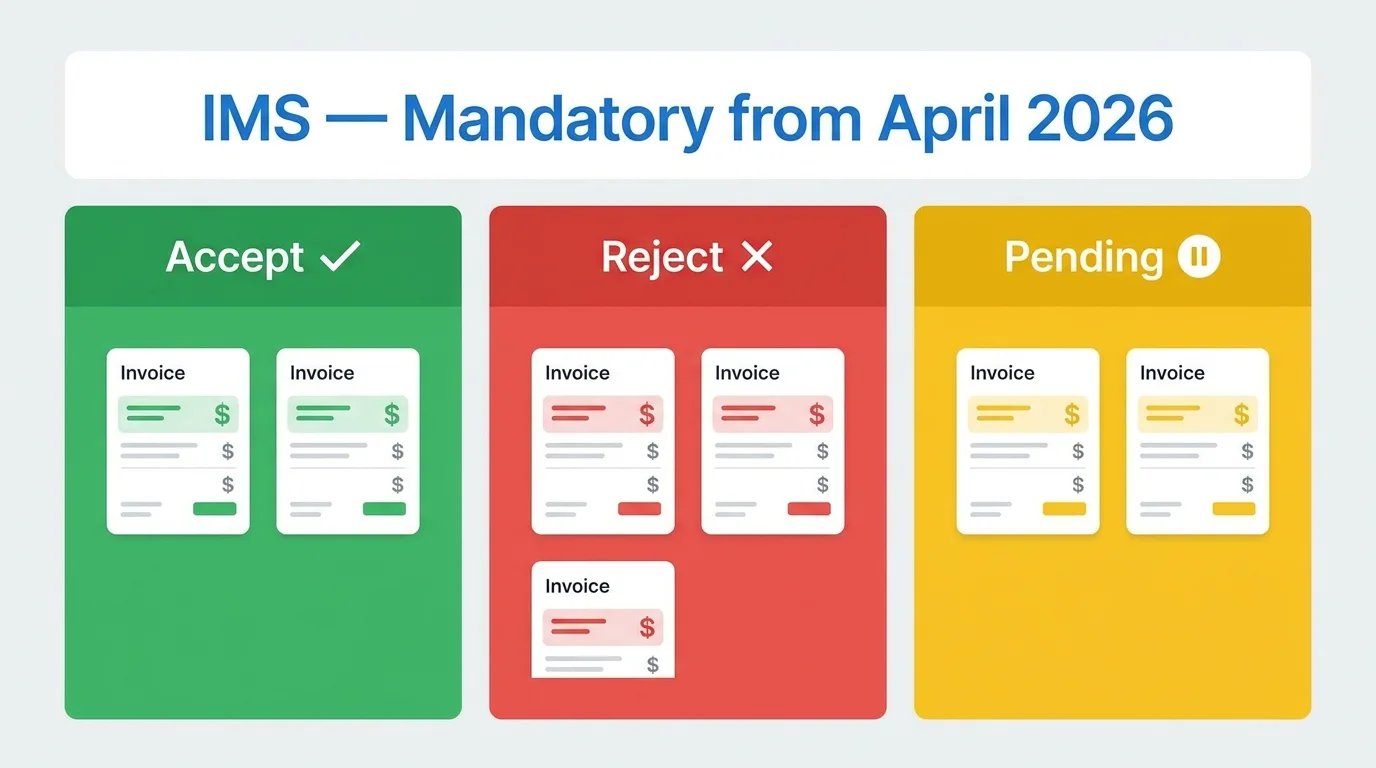
Most Businesses Are Using IMS Wrong And It Is Going to Cost Them ITC
Since April 1, 2026, the Invoice Management System (IMS) is no longer a tab you can ignore on the GST portal. It is a mandatory step in your monthly compliance cycle.
Every invoice your supplier uploads into GSTR-1 lands in your IMS dashboard. What you do with it accept, reject, or leave pending directly determines what Input Tax Credit you can claim in GSTR-3B. The GST portal now enforces hard blocks: ITC on invoices not reflected in GSTR-2B is simply not available.
The problem is that most businesses either do not know IMS exists, or they know it exists and are doing one of two things that will hurt them: accepting every invoice without reviewing it (claiming ITC they should not), or leaving everything pending and then scrambling the night before GSTR-3B is due.
This guide explains exactly how IMS works, what each action means for your ITC, the mistakes that trigger notices, and a practical monthly workflow that takes under 30 minutes if you do it right.
What Is IMS and Why Did GSTN Introduce It?
Before IMS, Input Tax Credit claims worked like this: your supplier filed GSTR-1, the system auto-populated GSTR-2B, and you filed GSTR-3B claiming the ITC from GSTR-2B often without looking closely at whether each invoice was legitimate, correctly valued, or even for goods you actually received.
This created two problems that cost the government significant revenue. First, businesses claimed ITC on invoices from suppliers who never paid the underlying tax what GSTN calls "fake invoice fraud." Second, honest businesses sometimes claimed ITC on invoices for goods that were returned, cancelled, or disputed and never filed amendments to reverse that credit.
IMS solves both problems by inserting a mandatory review step between your supplier's GSTR-1 filing and your GSTR-2B generation. You now have to actively manage each invoice tell the system whether you accept it, reject it, or are still figuring it out.
IMS went live in read-only mode on 1 October 2024. Action functionality opened on 14 October 2024. It became fully mandatory with ITC hard blocks for non-reflected invoices on 1 April 2026.
Where to Find IMS on the GST Portal
Login to gst.gov.in with your GSTIN and password.
Navigate to: Services → Returns → Invoice Management System (IMS) Dashboard
You will see two tabs:
Inward SuppliesL: invoices from your suppliers (this is where you take action for ITC)
Outward Supplies: shows your buyers' actions on invoices you filed (for your information)
The Inward Supplies tab is where your monthly IMS work happens.
The Three Actions What Each One Actually Means
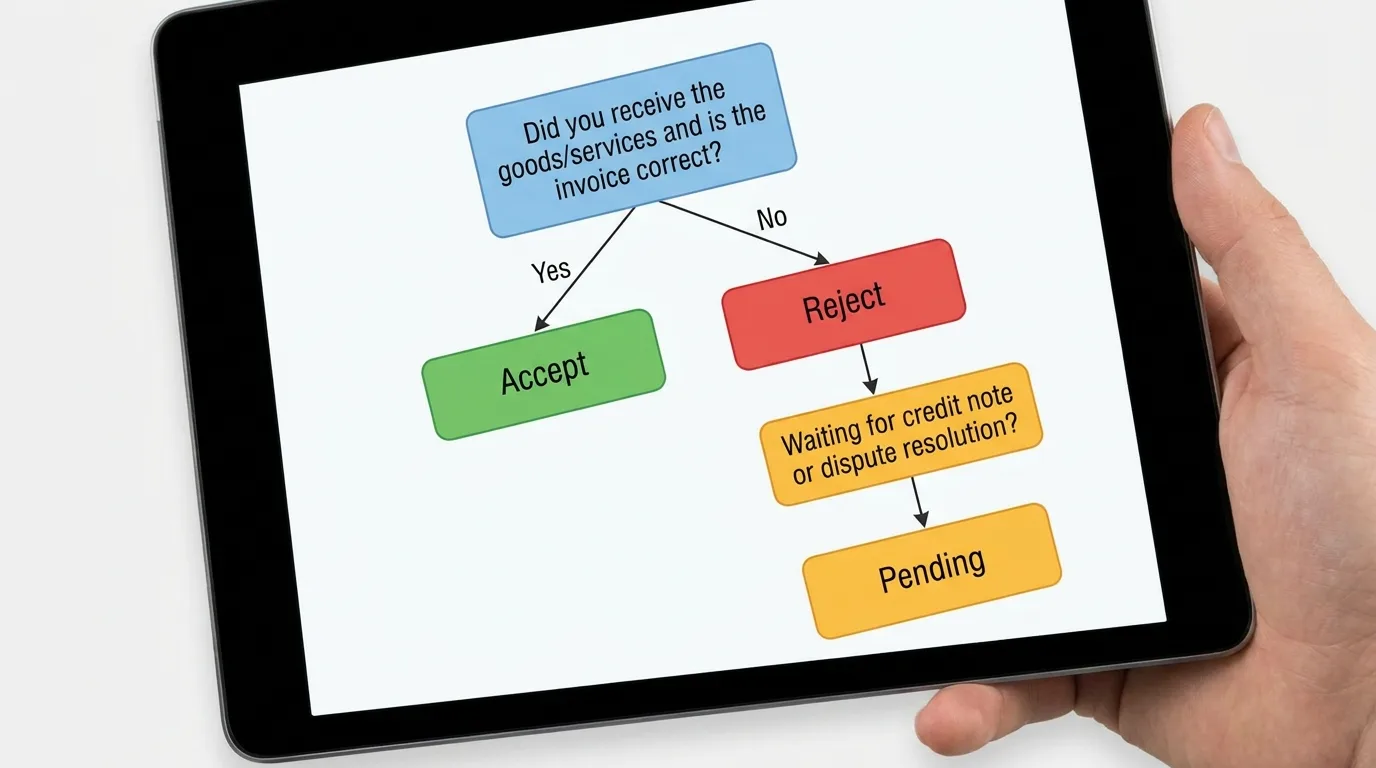
This is where most businesses get confused. "Accept" sounds obvious, but the implications of each action on your GSTR-3B are not what most people expect.
Accept ✓
You confirm: the invoice is valid, the goods or services were received, the value and tax rate are correct, and you want to claim ITC on it.
What happens: The invoice moves into GSTR-2B under "ITC Available" (Table 3). When you file GSTR-3B, this ITC is auto-populated in Section 4A (Eligible ITC).
When to use: For every invoice that matches your purchase records, goods receipt notes, and the values in your books.
Reject ✗
You confirm: this invoice should not be in your ITC either because you never received the goods, the invoice is incorrect, the supplier issued it in error, or you are not eligible for this ITC.
What happens: The invoice moves to GSTR-2B under "ITC Rejected" (Table 4). No ITC flows into GSTR-3B from this invoice. The supplier's GSTR-1 also shows the rejection they can amend the invoice in GSTR-1A if needed.
When to use: For invoices you did not receive, duplicate invoices, invoices for goods returned before acceptance, or invoices where your ITC eligibility is blocked under Section 17(5).
Critical: Once you reject an invoice and file GSTR-3B, the rejection is permanent for that tax period. The invoice cannot be re-accepted later. If you reject by mistake, the only recourse is for your supplier to issue a fresh invoice.
Pending ⏸
You flag: you are not yet ready to make a decision typically because a dispute is ongoing, a credit note is expected, or you are waiting for physical verification of goods.
What happens: The invoice stays in IMS and does not appear in GSTR-2B for that month. No ITC is available. The invoice will remain in IMS until you take a final action (accept or reject) in a future tax period.
When to use: Sparingly. For invoices where a credit note is expected from the supplier within the next 30 days, or where a goods receipt dispute is being resolved.
Warning: Pending is not a safe neutral position. If an invoice stays pending past the Section 16(4) deadline for ITC claims (generally the GSTR-3B due date for September of the following year, or the annual return filing date whichever is earlier), you permanently lose the right to claim that ITC. Do not use pending as a way to postpone decision-making indefinitely.
What Happens If You Take No Action at All?
This is the default behavior question that confuses most taxpayers.
If you take no action on an invoice in IMS, it is automatically deemed accepted on the 14th of the following month when GSTR-2B is generated. The ITC flows into your GSTR-3B as if you had clicked Accept.
This sounds convenient. It is actually a compliance risk for some businesses.
If you routinely have invoices for ineligible purchases flowing through your GSTR-1 purchases for personal use, blocked credits under Section 17(5), invoices from exempt or composition suppliers those invoices will automatically flow into your ITC if you never look at IMS. You will have claimed ITC you are not entitled to, without any conscious decision.
A GST officer reviewing your returns will see ITC claimed on a blocked credit item. You will owe that tax back plus 24% interest per annum. The fact that "IMS auto-accepted it" is not a valid defence.
The right approach: Review IMS at least once a week during the month. Do not wait until the 13th-14th when GSTR-2B generates.
The IMS Monthly Workflow 30 Minutes That Protects Your ITC
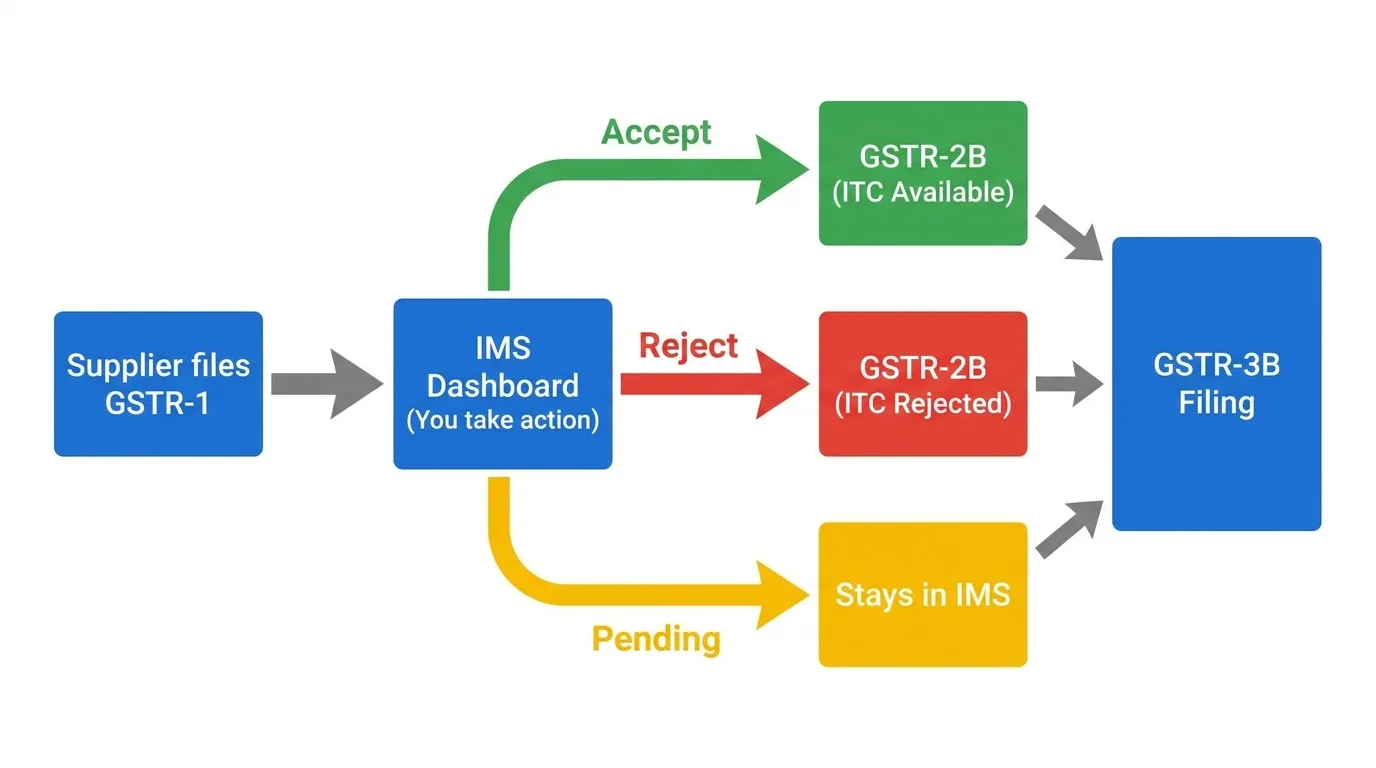
Here is the practical process that makes IMS manageable without taking hours every month.
Week 1 of the Month (1st–7th)
Suppliers file GSTR-1 by the 11th of the previous month. Most early filers' invoices will already be in your IMS. Log in and do a first pass:
Match invoices against your purchase register
Accept anything that is clearly correct
Flag anything that needs a credit note or is disputed as Pending
Week 2 (8th–13th)
Most suppliers have filed by now. Complete your review before GSTR-2B generates on the 14th:
Reject invoices for goods returned or not received
Accept all verified invoices
Make a final decision on anything still Pending do not carry forward unless you have a specific reason
14th of the Month
GSTR-2B generates based on your IMS actions. After generation:
Download GSTR-2B
Cross-check with your purchase register one final time
Use the SmartGST GSTR-2B Reconciliation Tool to identify any remaining mismatches
20th of the Month (or your GSTR-3B due date)
File GSTR-3B using the ITC populated from GSTR-2B. At this point, accepted and rejected invoices are locked for the period. Pending invoices carry forward to next month's IMS.
Total active time if done consistently: 20–30 minutes per month for a business with 50–100 invoices. Businesses with hundreds of invoices should process IMS weekly, not monthly.
Five IMS Mistakes That Trigger GST Notices
Mistake 1: Accepting invoices without checking Section 17(5) blocked credits
Section 17(5) of the CGST Act lists categories of purchases where ITC is permanently blocked food and beverages, club memberships, health services, works contract on immovable property (unless you are in the construction business), motor vehicles for personal use, and others.
If your supplier issues a tax invoice for any of these and you accept it in IMS, you are claiming blocked credit. IMS does not filter this automatically it is your responsibility to reject or not claim ITC on blocked credit invoices.
Mistake 2: Rejecting an invoice when a credit note is the right solution
If your supplier supplied you with 100 units but billed for 120, the correct resolution is for them to issue a credit note for 20 units not for you to reject the entire invoice. Rejecting the invoice means you lose ITC on the 100 units you actually received. Mark it Pending and ask your supplier to issue a credit note. Once the credit note appears in IMS, accept the original and take action on the credit note.
Mistake 3: Using Pending indefinitely for invoices where you know the goods were not received
If you definitively did not receive goods or services, reject the invoice in the current month. Keeping it Pending does not help you it just defers the problem. If you later lose the ITC claim window under Section 16(4) while the invoice sits Pending, you have lost both the goods and the ITC.
Mistake 4: Not reviewing IMS at all and relying on auto-acceptance
Auto-acceptance works correctly only if every invoice your suppliers file is legitimately yours to claim ITC on. That is rarely true for all invoices in a month. Some will be for blocked credits, some may be wrong values, some may be from suppliers who are now cancelled (in which case the ITC is questionable). Auto-acceptance without review is a passive compliance risk.
Mistake 5: Filing GSTR-3B before regenerating GSTR-2B post-IMS actions
After you take actions in IMS especially if you have made decisions after the 14th GSTR-2B must be regenerated to reflect your latest actions before you file GSTR-3B. Many businesses file GSTR-3B using a stale GSTR-2B that does not include their most recent IMS actions. The result: ITC on invoices they accepted is not claimed, or ITC on invoices they rejected is still populated.
Always regenerate GSTR-2B after any IMS action, then file GSTR-3B.
IMS and Specific Transaction Types
Credit Notes
When your supplier issues a credit note (in GSTR-1), it appears in your IMS separately. You must take action on the credit note independently of the original invoice.
If you accept the credit note, it reduces your ITC in GSTR-2B by the credit note amount. If you reject it, the original ITC remains unchanged but you have now disagreed with your supplier about whether the credit note is valid.
Import of Goods
Import invoices do not appear in IMS. ITC on imports is governed by the Bill of Entry and flows into GSTR-2B automatically (Table 6). You do not need to take IMS action on import transactions.
RCM (Reverse Charge Mechanism) Transactions
RCM transactions where you pay tax as the recipient also do not flow through IMS. RCM ITC is self-generated and enters GSTR-3B directly. IMS only covers forward charge invoices from your GST-registered suppliers.
ISD (Input Service Distributor) Credits
If your business receives ITC through an ISD (a centralized office that distributes common input service credits), those ISD distributions do not flow through IMS either. ISD credits appear in GSTR-2B automatically.
IMS and the New E-Way Bill Rules The Connection
There is a practical link between IMS and the new e-Way Bill Ship-To GSTIN requirement that takes effect on 15 June 2026.
When goods are dispatched under a Bill-To/Ship-To transaction, the EWB now carries the Ship-To GSTIN. The ITC, however, is claimed by the Bill-To party (the invoice party). In IMS, the invoice appears in the Bill-To GSTIN's dashboard even though the goods physically went to a different location.
This means your IMS reconciliation must be cross-referenced with your EWB records. If an invoice shows up in your IMS but no corresponding EWB shows delivery to your premises or a location you control, investigate before accepting.
Read the complete breakdown in the E-Way Bill New Rules June 2026 guide to understand how EWB and IMS work together for Bill-To/Ship-To transactions.
IMS in Numbers
Metric | Data |
|---|---|
IMS launch date (read-only) | 1 October 2024 |
IMS action functionality opened | 14 October 2024 |
IMS mandatory from | 1 April 2026 |
GSTR-2B generation date | 14th of every month |
Section 16(4) ITC expiry | September 30 of the following financial year (GSTR-3B due date) |
Penalty for wrong ITC claim | Tax amount + 24% interest per annum |
Offline Excel utility launched | May 2026 |
Tools to Make IMS Compliance Easier
GSTR-2B Reconciliation Tool ➡️ After taking IMS actions and regenerating GSTR-2B, use this to match your purchase register against GSTR-2B line by line. Catches mismatches before GSTR-3B filing.
ITC Eligibility Checker ➡️ Before accepting an invoice in IMS, verify whether the purchase category qualifies for ITC under Section 17(5). Prevents blocked credit mistakes.
ITC Reversal Calculator ➡️ If you have already claimed ITC that must be reversed (e.g., goods returned, supplier cancelled), calculate your exact reversal liability before filing.
GST Registration Status Checker ➡️ Verify supplier GSTIN status before accepting their invoices in IMS. Never accept ITC from a suspended or cancelled GSTIN.
GSTR Mismatch Checker ➡️ Cross-check GSTR-1, GSTR-2B, and GSTR-3B data to identify discrepancies before they become notices.
GST Health Score ➡️ Get an overall compliance risk assessment including IMS management gaps, pending ITC claims, and filing consistency.
GSTR-9 Estimator ➡️ Your annual return reflects 12 months of IMS decisions. Use this to get an advance estimate and identify any clean-up needed.
Related Articles on SmartGST
E-Way Bill New Rules from 15 June 2026 ➡️ IMS and EWB changes are happening simultaneously. If your business does Bill-To/Ship-To transactions, both affect your ITC management.
How to File GSTR-3B, 2025-26 Complete Guide ➡️ IMS feeds directly into GSTR-3B. Understand how accepted invoices in IMS populate GSTR-3B Section 4.
GST 2.0 New Rate Structure 2025-26 ➡️Rate changes under GST 2.0 affect which invoices carry correct GST review this before accepting invoices at old rates in IMS.
GSTAT Appeal Deadline 30 June 2026 ➡️ If a past wrong ITC claim resulted in a GST demand order, this deadline gives you a path to fight it.
How to Check and Respond to a GST Notice ➡️ IMS mismanagement is generating advisory notices across India. Here is how to respond if you receive one.
References
GSTN IMS Implementation Guidelines October 2024 ➡️ gst.gov.in
CBIC Circular No. 230/24/2024-GST dated 10 October 2024 Clarification on IMS and GSTR-2B
Section 16 of the CGST Act, 2017 Eligibility and conditions for ITC
Section 17(5) of the CGST Act, 2017 Blocked credits
GSTN Advisory Excel Offline Utility for IMS, May 2026
CA Ashish Singla IMS Acceptance, Rejection and Pending Actions analysis, TaxGuru, May 2026
GSTN Technical Documentation IMS Process Flow and GSTR-2B Generation
Tax Garden IMS Mandatory from April 1, 2026: Practical Guide, April 2026
Section 16(4) of CGST Act Time limit for ITC claims
Never Get Caught Off-Guard on GST Compliance Again
IMS is now mandatory. E-Way Bill rules change on 15 June. GSTAT deadline is 30 June. Three major GST compliance requirements all in the same month.
This is the pace at which GST compliance moves. Businesses that stay ahead of it protect their ITC, avoid notices, and spend zero unplanned time on fire-fighting. Businesses that wait to read about changes after the deadline pay the price.
The SmartGST WhatsApp Channel publishes every CBIC advisory, GSTN update, and GST Council decision in plain English within 24 hours of the official release.
No spam. No generic news forwarding. Just GST updates that require action from your business, explained clearly the day they happen.
Content verified against GSTN IMS Implementation Guidelines, CBIC Circular No. 230/24/2024-GST, and Section 16 of the CGST Act, 2017. Last updated: 8 June 2026. Verify current IMS process at gst.gov.in before making compliance changes.