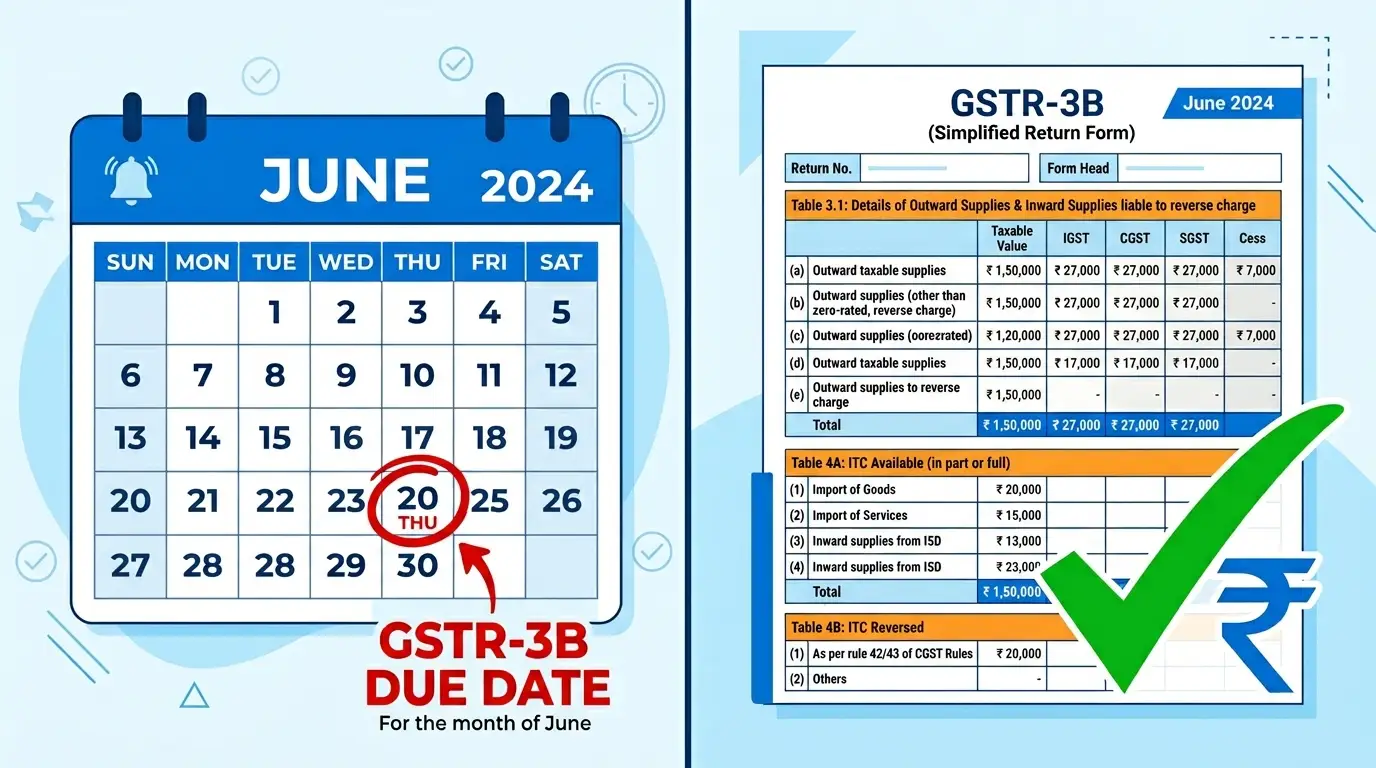
GSTR-3B Filing Guide 2025-26: Due Date, Table Structure, ITC Rules, and Mistakes That Trigger Notices
Every month, lakhs of businesses file GSTR-3B without fully understanding what they are actually signing off on. And then the notices come.
Over 35% of GST notices in 2025 were linked to mismatches between GSTR-1 and GSTR-3B, according to CBIC data. That number has gone up since July 2025, when the GST portal started hard-locking key fields in GSTR-3B so they cannot be manually edited. If your outward supply liability figures were wrong in GSTR-1, you can no longer just fix them in GSTR-3B. You have to go back and file Form GSTR-1A first.
This guide explains how GSTR-3B actually works, what changed in the last 12 months, and exactly how to file it without creating problems for yourself downstream.
What is GSTR-3B and Who Must File It
GSTR-3B is a monthly self-declared summary return. Every GST-registered business that falls under the regular taxpayer category must file it. You report your total sales, your eligible Input Tax Credit, any reverse charge liabilities, and you pay the net tax due.
It is not an invoice-level return. You do not upload individual bills here. Those go in GSTR-1. GSTR-3B takes the summary numbers from your GSTR-1 and your purchase register and consolidates them into a single tax payment and credit claim.
The following categories do NOT file GSTR-3B:
Composition scheme taxpayers they file CMP-08 quarterly and GSTR-4 annually
Input Service Distributors they file GSTR-6
Non-resident taxable persons they file GSTR-5
TDS deductors they file GSTR-7
E-commerce operators deducting TCS they file GSTR-8
If you are a regular taxpayer under GST and none of the above apply to you, GSTR-3B is mandatory every month.
GSTR-3B Due Dates for FY 2025-26
The due date depends on your filing frequency.
Monthly Filers (Turnover above Rs. 5 crore)
The 20th of the month following the return period. So April 2026 GSTR-3B is due by May 20, 2026. May 2026 GSTR-3B by June 20, 2026. This does not change regardless of your state.
QRMP Scheme Filers (Turnover up to Rs. 5 crore)
Quarterly filers have different due dates based on the state category:
Category 1 states (south and west India including Maharashtra, Karnataka, Tamil Nadu, Gujarat, Andhra Pradesh, Telangana, Kerala, Goa, Rajasthan, Madhya Pradesh, Chhattisgarh, and the union territories): 22nd of the month following the quarter end.
Category 2 states (north and east including Delhi, UP, Bihar, Jharkhand, West Bengal, Odisha, Assam, and Himachal Pradesh): 24th of the month following the quarter end.
So for the quarter ending June 2026, Category 1 filers pay by July 22 and Category 2 by July 24.
Important: Tax payment for QRMP filers is not deferred to the quarterly due date. For the first two months of every quarter, you pay tax using Form PMT-06 by the 25th of that month. The actual GSTR-3B is filed only at the quarter end.
Check the exact upcoming dates any time using the SmartGST Due Date Calendar it is updated automatically and shows state-wise dates.
The Structure of GSTR-3B: Table by Table
GSTR-3B has six main tables. Most errors come from people not understanding what each table actually covers.
Table 3.1 → Outward Supplies and Tax Liability
This is where you declare your total sales for the period. Split across:
3.1(a): Taxable outward supplies other than zero-rated your domestic B2B and B2C sales
3.1(b): Zero-rated supplies with payment of tax exports where you pay IGST upfront
3.1(c): Other zero-rated supplies on LUT/Bond exports where you are not paying tax (covered under LUT)
3.1(d): Inward supplies liable to reverse charge this captures your RCM liability as a buyer
3.1(e): Non-taxable outward supplies supplies of exempt goods or services
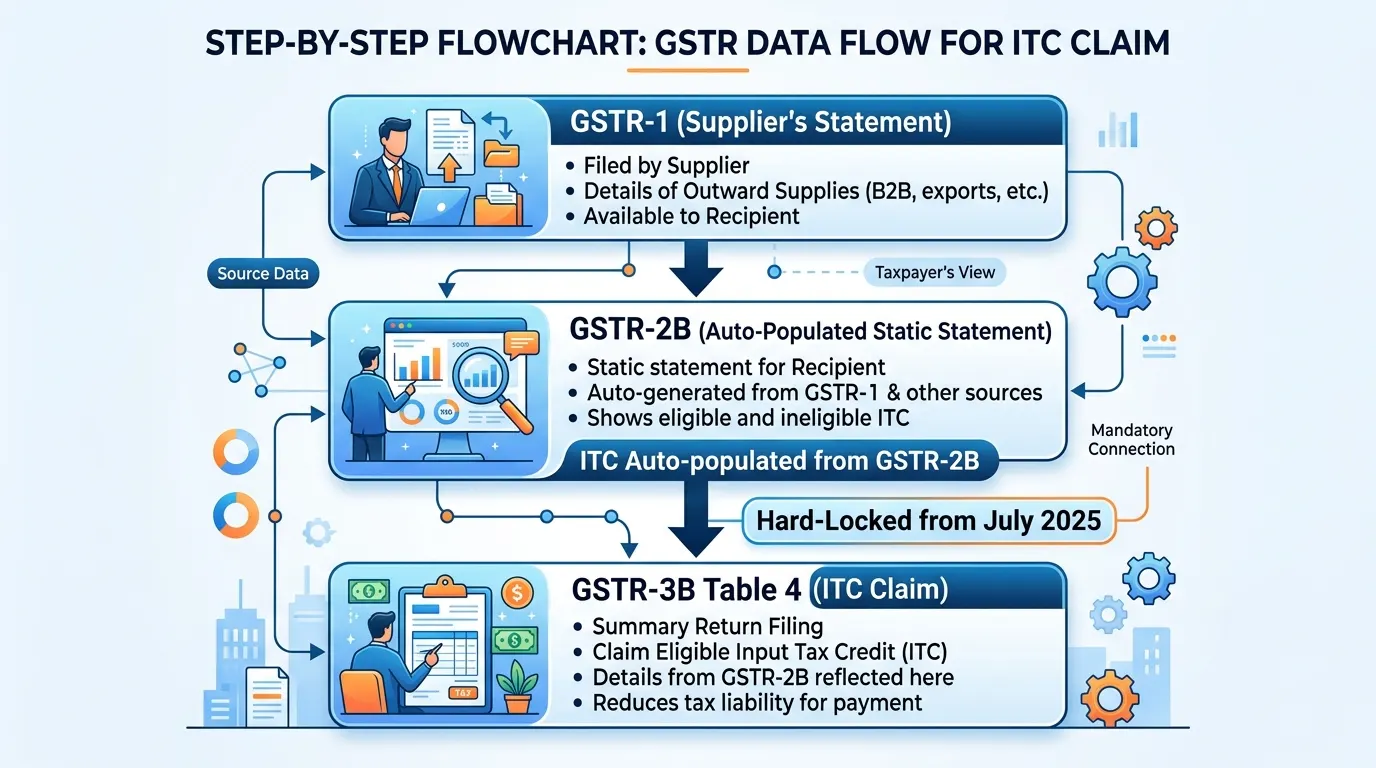
Critical change from July 2025: Fields 3.1(a) and 3.1(b) are now auto-populated from your GSTR-1 and hard-locked. You cannot manually change these numbers in GSTR-3B. If you filed GSTR-1 with an incorrect figure, you must file GSTR-1A (amendment form) first, wait for it to reflect, and then file GSTR-3B.
Table 3.2 → Inter-State Supplies
Captures supplies made to unregistered persons, composition taxpayers, and UIN holders on an inter-state basis. From the November 2025 tax period, these values are also auto-populated from GSTR-1 and are non-editable.
Table 4 → Eligible ITC
This is the most complex table and the one most likely to cause problems. It has four sub-sections:
4A: ITC available broken into imports of goods, imports of services, inward supplies from ISD, reverse charge, and other ITC (from GSTR-2B)
4B: ITC reversed Rule 42/43 reversals, other reversals
4C: Net ITC available 4A minus 4B
4D: Ineligible ITC amounts reflected in GSTR-2B but which you are NOT claiming because they are blocked under Section 17(5)
The GSTR-2B Rule: Since Section 16(2)(aa) came into effect, you can only claim ITC on invoices that appear in your GSTR-2B. The portal auto-populates the eligible ITC in Table 4A based on your GSTR-2B. If you try to manually increase this amount to claim ITC on invoices not in your GSTR-2B, the portal flags it in red and it becomes a trigger for ASMT-10 scrutiny notices.
Table 5 → Exempt, Nil-Rated, and Non-GST Inward Supplies
Captures your purchases from composition dealers and other non-taxable sources. Not relevant for most businesses but must be filled if applicable.
Table 6 → Payment of Tax
This is where the system computes your net tax payable after offsetting ITC and you authorize the payment from your Electronic Cash Ledger or ITC Ledger.
How to File GSTR-3B: Step by Step
Step 1: File GSTR-1 First
You cannot file GSTR-3B for a period without filing GSTR-1 for the same period first. The outward liability in Table 3.1 is populated from your GSTR-1. If GSTR-1 is not filed, those fields stay blank and you cannot proceed.
Step 2: Download Your GSTR-2B
GSTR-2B is available from the 14th of each month. It shows all the invoices your suppliers have uploaded in their GSTR-1 for the previous month. This is your ITC reference document. Do not skip this step.
Cross-check your GSTR-2B against your purchase register before touching Table 4. If an invoice is in your books but not in GSTR-2B, do not claim ITC on it in this month's return. Chase the supplier to upload it. The ITC will appear in next month's GSTR-2B. Use the GSTR-2B Reconciliation tool on SmartGST to do this quickly.
Step 3: Log Into the GST Portal
Go to gst.gov.in. Navigate to Returns > Return Dashboard. Select the financial year and tax period. Click on GSTR-3B to begin.
Step 4: Fill Table 3.1
Check the auto-populated figures from GSTR-1. Do not try to override them. If a figure looks wrong, it means your GSTR-1 was wrong. Stop, file GSTR-1A, and come back.
Step 5: Fill Table 4 (ITC)
The auto-populated ITC from GSTR-2B will appear in 4A. Review it against your purchase register. Do not claim more than what appears. If you want to voluntarily reverse any ITC (say, for supplies used for personal purposes), enter those in 4B.
Step 6: Fill RCM Liability in Table 3.1(d)
If you received services from unregistered suppliers, imported services, or any other supply attracting RCM, declare the liability here. Many businesses forget this step and get notices later.
Step 7: Preview and Compute Tax
Click Compute Liability. The portal calculates your net tax after ITC. Review the amount carefully before proceeding.
Step 8: Pay Tax
If there is a cash tax liability after ITC offset, pay it from your Electronic Cash Ledger. If the cash ledger is insufficient, top it up via net banking or UPI before filing. Tax payment and return filing are one single action in GSTR-3B you cannot file without paying.
Step 9: File Using DSC or EVC
Authorize the return using your Digital Signature Certificate (for companies and LLPs) or Electronic Verification Code (OTP on registered mobile) for individuals, proprietorships, and partnerships.
Once filed, GSTR-3B cannot be revised. All corrections must happen in subsequent months.
GSTR-3B Late Fee and Interest Exact Numbers
Late Fee (Section 47 of CGST Act)
For returns with tax liability:
Rs. 50 per day (Rs. 25 CGST + Rs. 25 SGST)
Maximum Rs. 10,000 per return (Rs. 5,000 each)
Businesses with turnover up to Rs. 1.5 crore: capped at Rs. 2,000 per return
Businesses with turnover Rs. 1.5 crore to Rs. 5 crore: capped at Rs. 5,000 per return
For NIL returns (no outward supply, no tax liability):
Rs. 20 per day (Rs. 10 CGST + Rs. 10 SGST)
Maximum Rs. 500 per return
Interest (Section 50 of CGST Act)
18% per annum on net tax liability (the cash portion, not the ITC portion) calculated from the day after the due date to the date of actual payment
From January 2026, the GST portal auto-computes interest in Table 5.1 of GSTR-3B based on the minimum cash balance in your Electronic Cash Ledger during the delay period
24% per annum if you wrongly claimed ITC or reduced output tax liability incorrectly this applies during audit or scrutiny proceedings
Key point: Late fee is always paid from cash. You cannot use ITC to pay late fees. Keep that in mind when calculating the actual cost of a delayed filing.
Use the SmartGST Penalty Calculator to calculate the exact late fee and interest before filing a delayed return. Enter the due date, filing date, and tax liability to get the precise amount.
8 Mistakes That Guarantee a GST Notice
Mistake 1: Mismatch Between GSTR-1 and GSTR-3B
This is the single biggest trigger. You report Rs. 10 lakh sales in GSTR-1 but only Rs. 9 lakh in GSTR-3B Table 3.1. Rule 88C kicks in automatically and a notice lands.
Since July 2025, Table 3.1 is hard-locked from GSTR-1. This specific mismatch is now harder to make accidentally. But if GSTR-1 itself had errors, you still have a problem.
Mistake 2: Claiming ITC on Invoices Not in GSTR-2B
Section 16(2)(aa) is absolute. If the invoice is not in your GSTR-2B, the ITC is not available to you yet. Claiming it anyway results in a mismatch notice under Rule 88D and interest recovery.
Mistake 3: Missing RCM Liability
Many small businesses pay legal fees, rent to unregistered landlords, freight charges, or import services. All of these attract reverse charge. Forgetting to declare them in Table 3.1(d) creates a liability gap that often surfaces during annual return reconciliation or scrutiny.
Mistake 4: Not Filing NIL GSTR-3B
If you had zero business in a month, you still have to file a NIL GSTR-3B by the 20th. Missing it costs Rs. 20 per day, capped at Rs. 500. More importantly, from July 2025, missing GSTR-3B for two consecutive months means the portal blocks your future filings and e-way bill generation.
Mistake 5: Time-Barred ITC
You can only claim ITC on an invoice up to November 30 of the following financial year or the date of filing GSTR-9 for that year, whichever is earlier. An invoice from March 2025 that your supplier uploaded late cannot be claimed after November 30, 2025. This is a permanent loss not recoverable through any amendment.
Mistake 6: Paying Interest on Gross Instead of Net Liability
Interest under Section 50 applies only on the cash portion of your tax payment, not on the ITC you used. If your total liability was Rs. 1 lakh and you settled Rs. 70,000 from ITC and Rs. 30,000 in cash interest applies only on Rs. 30,000. Many businesses self-calculate interest wrong and either overpay or underpay.
Mistake 7: Incorrect CGST/SGST vs IGST Classification
For intra-state supplies, split as CGST and SGST (equal halves of the total rate). For inter-state supplies, charge IGST. Putting an intra-state transaction as IGST or vice versa does not change the total tax amount but creates a classification mismatch that the portal flags and that creates complications during ITC utilization for the buyer.
Mistake 8: Not Reconciling Before Filing
Filing GSTR-3B without comparing it to your GSTR-1 output and GSTR-2B inward data is the root cause of most errors. Run the comparison every month before clicking submit. The GSTR Mismatch Checker on SmartGST shows you GSTR-1 vs GSTR-3B discrepancies in seconds.
The GSTR-3B and IMS Connection
From October 2024, the Invoice Management System (IMS) became the gateway between supplier invoices and your GSTR-2B. When a supplier uploads an invoice in their GSTR-1, it appears in your IMS dashboard. You can accept, reject, or keep it pending.
Only accepted invoices flow into your GSTR-2B and from there into GSTR-3B Table 4.
This means two things:
First, if you do not act on invoices in IMS, they still flow into your GSTR-2B by default. But if you reject an invoice wrongly, the ITC disappears from your GSTR-3B and you need to un-reject it to recover it.
Second, if a supplier issues a credit note in their GSTR-1, it reduces the ITC available to you in GSTR-2B. Budget 2026 has now made it mandatory that your ITC reversal on a credit note must mirror the supplier's credit note value in real time. This enforcement is tighter than before.
Read the detailed IMS guide on SmartGST before processing invoices in IMS for the first time.
Can GSTR-3B Be Revised After Filing?
No. Once you file GSTR-3B for a period, it cannot be revised directly.
For errors in outward supply (Tables 3.1 and 3.2): Correct the figures in GSTR-1A for the same period. The corrected figures flow into the next GSTR-3B. If you under-reported tax liability, declare the additional liability in the current month's GSTR-3B and pay interest from the original due date.
For excess ITC claimed (Table 4): Reverse the excess amount in Table 4B of the current month's GSTR-3B and pay 24% interest on the wrongly claimed amount. Alternatively, if you receive a mismatch notice under Rule 88D, respond within 7 days with the correction.
For short ITC claimed: Simply claim the balance ITC in the next month's return. No reversal or penalty needed.
For missed RCM: Declare the liability in the current month's GSTR-3B and pay 18% interest on the amount from the original due date.
GSTR-3B Monthly Checklist Before You File
Run through this every month without fail:
GSTR-1 filed for the same period → yes or no
GSTR-2B downloaded on or after the 14th of the month → yes or no
Purchase register reconciled with GSTR-2B mismatches flagged
Supplier contacted for invoices missing from GSTR-2B → follow-up sent
RCM liability identified for the period list made
Time-barred ITC checked no invoices older than the cut-off date
Nil return confirmed if no transactions pre-filing done
Table 3.1 figures verified against GSTR-1 output no manual overrides attempted
Late fee and interest calculated if filing after the 20th penalty calculator used
Cash balance in Electronic Cash Ledger sufficient to pay net tax due
Data Accuracy DisclaimerAll information in this article is compiled from official CBIC notifications, GSTN advisories, and provisions of the CGST Act and CGST Rules. Key sources include the CBIC notification on GSTR-3B hard-locking (July 2025), GSTN Advisory on Table 3.2 reporting (December 2025), Section 16(2)(aa) and Rule 36(4) of the CGST Act/Rules, and Section 47 and Section 50 of the CGST Act.
GST rules are updated frequently. Always cross-verify with the official GST portal at gst.gov.in and cbic-gst.gov.in before making compliance decisions. SmartGST is an independent information platform and this content is not a substitute for professional tax advice.
References:CBIC Notification implementing GSTR-3B hard-lock, July 2025
GSTN Advisory on Table 3.2 reporting, December 5, 2025
Section 16(2)(aa) and Rule 36(4), CGST Act/Rules
Rule 88C and Rule 88D, CGST Rules (mismatch notices)
Section 47 and Section 50, CGST Act (late fee and interest)
GSTN Advisory on GSTR-2B auto-population and IMS integration, October 2025
Stay Ahead of Every GST Deadline
GST due dates, portal changes, and GSTN advisories keep coming. Missing one can block your filing or freeze your ITC.
Join the SmartGST WhatsApp Channel for instant alerts on every GSTR-3B due date extension, new advisory, and compliance deadline straight to your phone.
Join SmartGST WhatsApp Channel Free
Zero spam. Only what matters for your GST compliance.